Logging shots :
The following sequences of shots identify what i have filmed and edited from the opening credits - end credits, with the screen shots shown. Other member of my group filmed the same scenes in different angles.
Opening Credits
00:00-00:02

Shot 1- medium shot 00:03 - 00:06 ( people involved in shots : Lemar )

shot 2 - wide shot 00:7 - 00:32 ( Lemar & Cory )

shot3 - close - up 0:33 - 00:40 ( Draws , Lemar & Cory

shot4 - wide shot 00:41 - 00:45 ( Lemar & Cory )

shot5 - close - up 00:46- 00:51 ( Cory with price tag )

End Credits - 00:52- 00:55

These shots are the shots involved in the final video . There were many other takes of different angles . the reason why we chose these shots was because these were the most successful and they fitted well together.

This screen shot shows some of the different shot involved in the filming ,and what the thoughts of the shots were . The key shows further detail of the table .
Key
1= good
2= very good
3 = keepers
NG = No good
Shots :
WS = wide shot
MS = medium shot
2 shot = 2 people in a shot
track = tracking shot
TC IN = time code start / start
TC OUT = time code out / finish
Storyboards :
( my storyboard)
This story board shows my individual input to the group work , we each created our own storyboard and took pieces from each storyboard which is (shown below)


(our group storyboard)
This storyboard shows our final storyboard as a group , as you can see we each had our own input and added it into one storyboard
tv version
Full Version
Conclusion for adverts :
in the end we decided to make two adverts for our product , a short version and a full version. The reason being is that we wanted to make it seem more realistic by having a shorten version that was going to be put on "tv".
The longer advert was editted by Rianna , and i gave some input of shots , the shorten advert was edited by Elliot as he had the skills and the expierence before with shotening the advert , while keeping in the key information. However while one member / two was attending the editing the rest of the team filled in any missing gaps in work such as production diaries or anything on our blog.
In conclusion i think we worked well and sucessful as a group and we made decisions that helped eachother through tasks.
(improvements for advert merit standard)


Setting up & using equipment

When setting up a tripod you need to spread the tripod apart and then you adjust the leg locks by un- doing them . You then adjust the tripods feet and when you are happen with your height of the tripod you then adjust the leg locks . The leg locks allow you to secure your tripod and stay sterdy , if you do not secure the locks your tripod may be unbalanced and when shooting find it difficult to shoot straight.
Canon Legria HF R28


The red button at the end is the start / stop button , this allows you to start recording and stop whenever you like.
in the inside the on/off button , which turns the camera on and off. This camera is touch screen which enables the user to interact with and watch the filming back .
The skills needed to set up this equipment is paciences and knwelege. E.g. you need to know and be aware of any hazrads and the health and safety that could occure in the working space. You also need to have the pacience if anything goes wrong ; that you are able to fix it without any stress.
In editing you need to have some expiernece in knowing what the different tools do and how the different fumctions could help with your filming.
in order to make this successful we had to all take responsiblity of the equipmwnt and to make sure we took good care of the eqipment and the location that we was in ; we have to make sure that we put the equipment how it was left and that our personal behaviour was well seen through our filming and towards eachother and anybody else invloved.
Schedule of activities dates and lessons
Teaching & Learning Schedule : ( March )
WK 2 Monday 18th period 3 Lesson 1 Plans
WK 2 Monday 19th period 4 lesson 2 eqipment , materials & contigency plans
WK 2 Tuesday 20th period 3 lesson 3 production , schedule & diary
WK 2 Thursday 22nd period 3 lesson 4 recce
WK 1 Wednesday 28th Period 1 lesson 5 risk assessment & hazards
WK 1 Thursday 29th period 3 Lesson 6 Writing copy and production paper edit , script & storyboard
Easter Break : ( April )
WK 2 Monday 16th period 3 lesson 7 Working Practices ( incl. Logging shots )
WK 2 Monday 16th Period 4 Lesson 8 camera and sound
WK 2 Tuesday 17th Period 3 Lesson 9 (filming finished by 19th)
WK 2 Thursday 19th Period 3 Lesson 10 Editing & Edit Record of dicisions and solutions ( HW Finish Edit ) Consolidation of Production Diaries
WK 1 Wednesday 25th Period 1 Lesson 11 Evaluate Production Process
WK 1 Thursday 26th Period 3 Lesson 12 Evaluate of Final Product

This production diary shows that induvidualy we filled out our own reece and that we craeted our own storyboards , however in the final storyboard we added our own section from our own and created it as one .
Opening scene:
We open with a graphical shot with the name that we decided to call the product 'BlockMiester draws' , in bold text to grab the audiences attention. ( This will be edited in iMovie once filming is complete).
(No actors or crew needed in this scene)
Cut to:
A close up shot of the product 'BlockMiester draws' ( then the theme tune starts as shots begins)
(No actors in scene).
The draws are on a table , with a plain bold background to make the elegant white draws stand out.
Cut to :
Music fades out, then voice over begins , shot zooming out from a close- up to a medium shot
voice over:
"you need new draws , well not just any any draws , you need NEW BLOCKMIESTER DRAWS "
Description of the draws : ( still in voice over ) (soft tone voice)
"This glistening , gleaming handle shines against the polished surface, these draws are elegant and would be perfect in your home ; office , or study room. Take a closer look" .
Cut to :
back to close-up shot , slowly as the draws are begging to open , something magical appears in draws
(prop in draws)
(In shot is actors hand over gleaming the handle opening the draws)
Cut to :
shot of the draws closing
Cut to:
Wide shot of the draws and the actor -
the actors description :
tall , dark haired , with sharp features , blue eyes , male , aged 17
Actor saids:
"thats why you should get your draws today only £80
End frame :
Back to graphical shot , name of the draws "BlockMiester draws' and the slogan 'Make Magic Happen' with a bold background against white elegant writing. (Edited on iMovie once filming is completed)


info shown in table format
Screen shot of Editing


These screen shots above identifies the parts that i have edited.
The first screen shot shows titles that introduce the advert with a question 'Do you need new draws'. Elliot edited the sound that goes with the titles.
The second screen shot shows a medium close-up shot of the draws opened, this part of the dialog explains that the draws are magic and lets the audience see how much the draws can contain. The third screen shot is a medium long shot of the two actors with the draws. The next screen identifies the price of the product which is £99.99 which then leads into a faster paced zoomed version. The last screen shot that i edited is the closing credits of our slogan 'make magic happen with blockmiester draws' which Elliot added sound to. In reflection I feel that the editing process worked well as each member of our group had our own responsibility to edited our own sections, I think that the editing process worked well as we filmed in a variety of shots which allowed us to choses from a variety of shot sizes and angles and they fitted well together. When it came to the final editing process this allowed us to make it look as professional as possible and to show the range of shots to help show the product in the best way as possible. Also in reflection to our filming process i feel that our framing of the shots was good as we got everything we needed in shot and we framed it so that we had enough head room to frame the actors. However if i was to do this editing process again i would add in some contact details such as a website or add in a voice over to make it seem a more professional advert and give it that extra feel to the people that watch it. overall i feel that our advert is successful and I have developed my editing skills by using tools such as cropping and fitting clips together and adding in traditions to blends the clips together to make them look like they fit more smoothly without jumping.
Clapperboard
A clapperboard is a device used in film making and video production to assists the synchronisation of the picture and sound. The current digital slate was invented by Matthew L. Davies, holder of US patent number 6831729. We didn't use any clapperboards in our production and we wasn't equipped with them and we didn't think it was neccesary to use them for our filming. Instead as an alternative we just shot each scene if different angles and shot sizes, we made our actors aware of this by telling them and you could hear the sound of the camera once it has started recording and stopped.
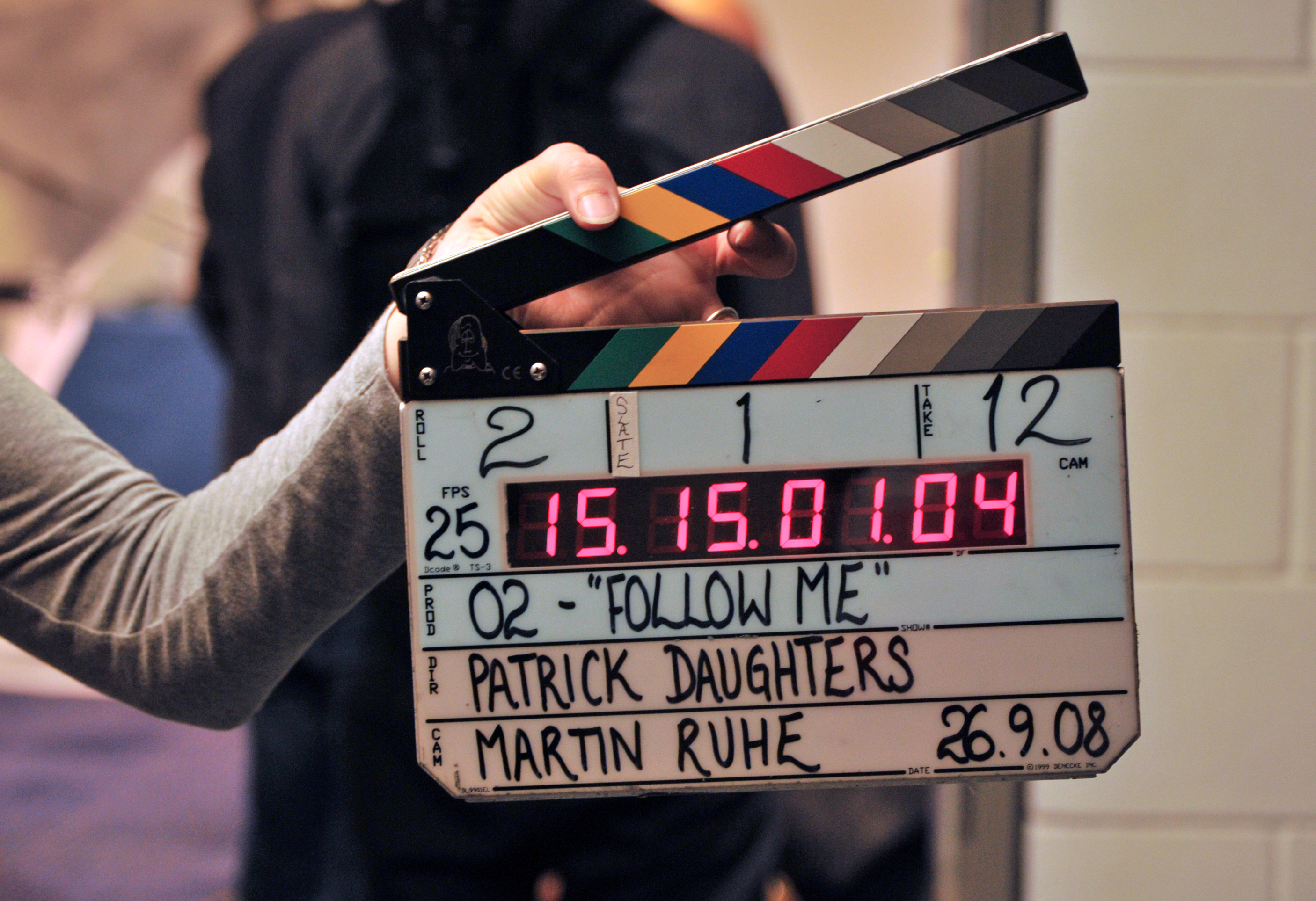
Here is a picture of a digital slate which is a clapperboard containing LED numbers and colored stripes on the sticks.
Below is the improved a merit by developing a brand new concept which emphasis the physical quality and aesthetic look of the product and makes clear links to nature by using a natural setting and gentle ambient music with natural sound. I used a range of camera shots and gradual transitions to emphasis the slow pace with big close ups of the the product from a range of angles to clearly show the spectator the attractive design and features. The language I have chosen to use is eloquent and persuasive and should appeal to an older audience who have taste and like quality furniture. The lighting is bright (natural sunlight) which add to the desirability of the product. The text I have used is elegant and also uses persuasive language.
Overall, I can say that having a much clearer concept with a more focused approach to the technical side of the advert has enabled me to create a better quality advert which will appeal to my target audience and satisfy the brief and requirements of my client. I used loops from free sound which enabled me to adjust the sound levels, in garage band. I used a peer member to record my script which i wrote, this was recorded with a microphone straight into garage band. By adjusting the equaliser levels this made my soundtrack more engaging and giving it a tranquil feel with the language used.
http://www.freesound.org/
.

No comments:
Post a Comment